


We will teach you how to spy on WhatsApp contacts and hack a WhatsApp account without issues.
In this year, there are three effective ways to spy on WhatsApp contacts. First, specialized monitoring software can track messages, calls, and media shared on the app by accessing the data directly from the device. Second, linking the target WhatsApp account to a web-based platform, such as WhatsApp Web, can provide real-time updates on chats and contacts if initial access to the device is available. Third, cloud backup extraction allows for retrieving WhatsApp data from services like iCloud or Google Drive, offering insights without constant access to the phone. Always use these methods responsibly and within legal boundaries.
There are at least three methods, and here we have shared the best practices for spying on contacts and tracking someone without letting them know.
What is WhatsApp Messenger?
WhatsApp is a free messenger. People and businesses in over 100 countries use it.
The messenger allows users to share not only text messages but also multimedia, including videos, photos, documents, locations, and voice messages.
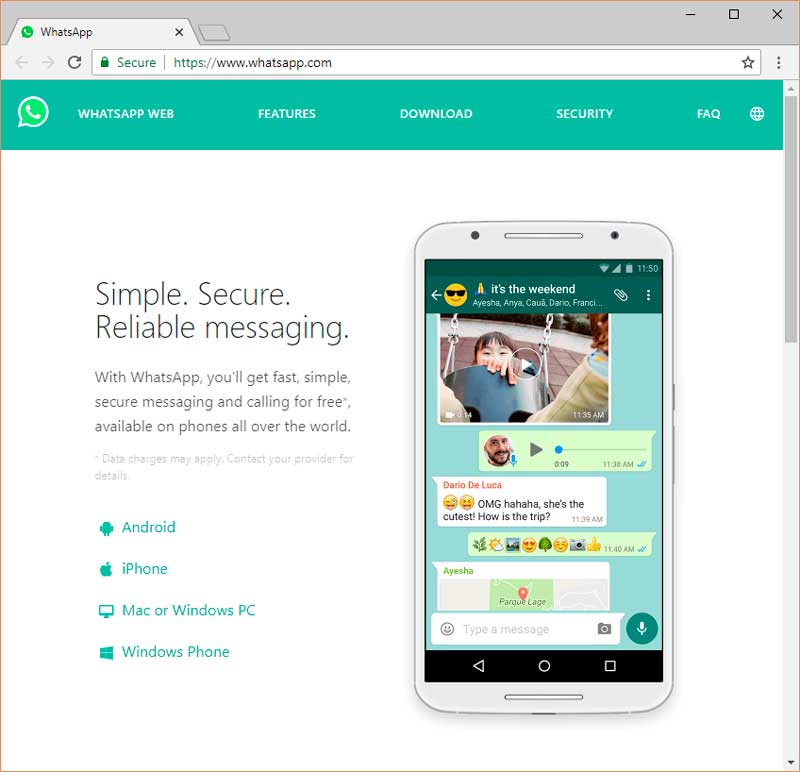
WhatsApp is a great source of information if you want to monitor someone.
One of the most precious pieces of information is someone’s contacts.
Imagine reading a message but not knowing who the author is.
We have prepared a complete guide on how to spy on WhatsApp contacts, and we will teach you how to stay hidden!
This year, many old methods do not work anymore, so we have collected only the freshest methods and will constantly be updating the article to give the methods that work.
Is it possible to hack a WhatsApp account without issues?
Hacking a WhatsApp account without issues is highly unlikely and unethical. WhatsApp is designed with end-to-end encryption, making it extremely secure against unauthorized access. Attempting to hack an account not only violates privacy laws but also risks severe legal consequences, including fines and imprisonment.
Additionally, hacking methods often involve phishing or malware, which can compromise the hacker’s own devices and data. Instead of resorting to such actions, it’s always better to seek transparent and legal solutions for any concerns involving WhatsApp accounts.
“Hack” is a term related to hackers, and most people are afraid of it.

We have good news for you: you do not need to search for a hacker or learn all the hacking tricks.
You can hack a WhatsApp account without issues or special skills.
There are three ways to hack a WhatsApp account:
- Use a spy application
- Use the WhatsApp web version
- Spoof a MAC address.
The last method requires knowledge of computers, but the rest are easy. Let’s look at each of them.
How to use a spy application to spy on WhatsApp contacts
To use a spy application for monitoring WhatsApp contacts, begin by installing the app on the target device, following the instructions provided by the software. Depending on the application, you may need physical access to the phone for installation and setup. Once installed, the app works discreetly in the background, capturing data such as chat history, call logs, and contact details.
This information is typically accessible through a secure online dashboard. Ensure that you have consent from the device owner, as unauthorized use of spy applications can breach privacy laws and lead to serious legal consequences.
For example, if the target device is an Android, you can download and install an Android tracking application. The same is true for iOS.
There is a big difference between Android and iOS. With Android, you do not need to root the phone.
To install a spy app on an iPhone, you must root the phone, also known as jailbreaking.
Rooting is quite dangerous because you could accidentally brick the phone.

This year, most people use Android cell phones, so we will concentrate on Android devices.
To track a WhatsApp contact list with spy software, you need to take three steps:

All you need to do for the last step is wait, and the spy application will collect all data.
In most cases, you will get the results — in this case, a copy of the contact list — the day after you install the app.
The best apps for spying on WhatsApp contacts

There are many fake offers on the spy app market.
Some applications do not work at all, while some work but worse than you expect.
Therefore, it is always necessary to research the market and find the best option.
To save you time, we have collected two of the best spy applications:




These apps are the best because they allow you to spy on WhatsApp contacts without letting the user know.
The target person will not catch on that he or she is being monitored.
Staying hidden is very important; you will not be happy if the target catches you.
Hoverwatch
Hoverwatch is a paid option, but it has a free trial period. During this time, you can use all its features. In some cases, this limited amount of time is enough to copy all the names and phone numbers from the contact list.
Moreover, it is enough time to try out the software and decide that it is the best.

With Hoverwatch, you can track not only WhatsApp contact lists but also the following:
[su_row][su_column size=”1/2″ center=”no” class=””]
- Viber, Snapchat, and any other messenger
- Calls and text messages
[/su_column] [su_column size=”1/2″ center=”no” class=””]
- Location History
- Browser history[/su_column][/su_row]
Hoverwatch does not require any knowledge about computers, and the interface is as simple as your web browser or any other software that you use every day.
The application also has a hidden mode, which means that you’ll remain completely hidden.
The main problem that you need to solve is how to install the app on the target device.
It would be nice to spy on WhatsApp contacts remotely without having the phone in your possession, but that is impossible. You have to hold the phone at least for a little while.
If you come across an offer on the internet to spy on someone without touching the target smartphone, be careful — it is probably a scam.
You already know that Hoverwatch will collect a lot of data, but you may still be wondering how to use it.
It is simple: The app collects the information, and you see all the collected data in the control panel.
Access to the control panel is secured by a password, but for you—the owner of the account — it is very simple.
Log in to your dashboard and find the data you are interested in. It is all sorted, so you can easily browse it.
Spying on WhatsApp contacts has never been easier than with Hoverwatch.
Try it today, and you will get not only phone numbers and names from the target device but also tons of other information.
uMobix WhatsApp Tracker
uMobix is one of my favorite spy programs available on the spy app market for value for money.
The application is easy to use and it can be called universal for any covert surveillance.

So with its help, you can get not only contacts from WhatsApp but also from any other messengers.
Why did I decide to use uMobix? Simple, I am not gonna sit and wait for something to happen. I read about Amanda Todd and other kids. Seriously, my son’s safety costs way more than $30.
The uMobix spy software is one of the first on the market, they started developing their software in 2011 and since then they are in the market leader.

[su_row][su_column size=”1/2″ center=”no” class=””]
One of the spy features they are best known for is a top-notch parental control feature as a monitoring program and spy app to monitor their children’s activities, including spying on WhatsApp.
[/su_column] [su_column size=”1/2″ center=”no” class=””]
Complete information about WhatsApp messages and conversations from the target device will be available in this app, including contact information, the date and time messages were sent and received, and all the media files they share.
[/su_column][/su_row]
Other notable best features of this spy app for WhatsApp are geofences and a fantastic built-in keylogger that provides real-time notifications from the target phone on an easy-to-understand app dashboard or interface.
[su_row][su_column size=”1/2″ center=”no” class=””]
Compatibility
The uMobix for WhatsApp spy app is licensed software that is compatible with Android phones, tablets, iPhones, and iPads. No jailbreak or root for Android is required, while there are separate jailbreak and non-jailbreak versions for the iPhone monitoring app.
[/su_column] [su_column size=”1/2″ center=”no” class=””]
How to install it?
Installation and account creation is quick and easy.
[/su_column][/su_row]
Pricing and Subscription
uMobix offers three packages for its spy tools, although prices vary slightly depending on which version and what usage you need.
[su_row][su_column size=”1/2″ center=”no” class=””] The basic package – starts at $29.99 per month.[/su_column] [su_column size=”1/2″ center=”no” class=””]The premium package is $69.9 per month.[/su_column][/su_row]

This is one of the best spy apps for WhatsApp that has everything you need from a spy tool or monitoring program, and our experience with this spy app has been fantastic.
The support team is available around the clock and will help you by chatting or phone.
How to use the web version of WhatsApp to copy a contact list

After a moment, all the conversations will open on your computer screen. If your aim is to find contacts, do not waste time.
Click on the “New Chat” button on the left side of the screen to open a list of the most frequently used contacts. These are people with who the victim is speaking most often.
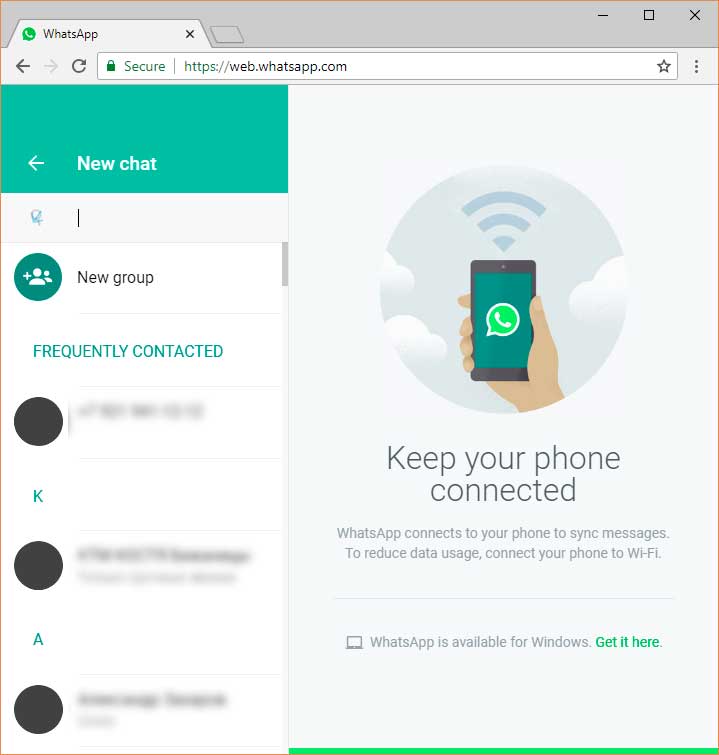
Turn the list below, and you will see the full list. This list has all the contacts from the target phone. Unfortunately, on the web version, you cannot automatically copy or export the contacts.
Rather, you will have to copy them manually. Move quickly!
This method does not work if you do not have a target phone in your hands. At least for a little while, you have to hold the smartphone.
Later on, you won’t need it because the web version works remotely and independently, but for the initial setup, you will need the phone.
Be careful because this method isn’t hidden.
Even if you successfully find the time and secretly hook the phone up to the computer, the target will get notifications that his account is being used on a Windows or Mac computer any time you access it.

The target can then block your connection with one click, and you will lose access to contacts and message archives, so you need to be fast.
We want also to add that you need to be ready to be discovered.
The target will not necessarily know that it was you but will know that his or her account has been spied on. Consider these facts when you choose a method to spy on contacts.
How to run the same WhatsApp account on two smartphones at the same time
Almost all modern cell phones on Android, iOS and other operating systems allow users to change the original MAC address to another one.
Search for the target’s address and make yours the same.

Please note that in some countries, this method is illegal. Before you try this method, please learn the laws of your country.
MAC spoofing is described in detail. Here we will focus only on MAC spoofing in relation to WhatsApp.
First, learn the target’s MAC address. To do so, you must hold the victim’s phone in your hands. There is no way to spy on WhatsApp contacts without having the phone.
To learn the target’s MAC address, look in the settings. The next steps depend on the operating system:
- iOS: General > About > WI-FI address
- Android: About the phone > Status > Wi-Fi MAC address
- BlackBerry: Options > Device > Device status info > WLAN MAC
- Windows Phone: About > More information > MAC address

This guide is valid for all current versions. If the victim has not updated the operating system in a while; try to find the MAC address by using the same logic mentioned above.
If you were following our instructions and the phone notified you that the MAC address wasn’t available, then restart the device or try to reconnect the internet.
When you access the MAC address, you will find something like this, “00:19:4C:3A:2B:7F.” This code is unique, and you must copy it or remember it.
Download and install a MAC spoofing application on your phone. You do not need to look for one on the “dark web” — some apps are available in the official app stores. Search the query “Change MAC address.”
Once you have downloaded and installed an app, type in the MAC address you learned earlier. Your phone will then act as a clone of the target phone.
To start WhatsApp, you must take one more step: enter an SMS code. The application will resend the code to start the app on your device. This time, you must have the target phone again in your hands. Nevertheless, it is the last time. Receive the code, and type it in on your phone.
After all the steps are done, you will see the same messenger on your phone as the target phone. Use the “New Chat” button to see the contact list.
This method is the most complicated and requires you to have the target device in your hands during the setup process. However, after all the steps are done, your phone will become a great source of information. You will always be updated — all the messages and contacts will be displayed on your phone the same as on the targets.
This method allows you to use the same WhatsApp account on two smartphones at the same time, but it will not work if you want to use two accounts on one phone.
You will not be able to use your own account until you are done tracking the target.
How to hack a WhatsApp account without issues

Hacking a WhatsApp account is not only unethical but also illegal in most jurisdictions. WhatsApp uses end-to-end encryption to protect user data, making unauthorized access extremely difficult and punishable by law.
Any attempts to hack an account—whether through phishing, malware, or exploiting vulnerabilities—can lead to severe consequences, including legal action and security risks to your own data. Instead of resorting to such methods, consider transparent and legal approaches to address any concerns involving WhatsApp accounts, always respecting privacy and ethical standards.
If you find an ad for hacking, please be careful. Some people promise to hack an account remotely or ask you only for the target’s phone number.
Most of the time, those ads are fraudulent. You can try, but pay only for the results (if there are any), and do not pay in advance.
WhatsApp is a well-secured application, and people who have the skills to hack someone just from a phone number will not work for spouses or parents who want to control their children.
Download and install any of the spyware programs discussed earlier in this article to spy on your contacts.
This app is the best method to hack WhatsApp this year because it does not require any knowledge or complicated installations.
In three simple steps, you can spy on WhatsApp contacts and get much more information than a contact list.
Сonclusion
In conclusion, while there are various ways to monitor WhatsApp contacts, such as using monitoring software, cloud backups, or linked devices, it’s essential to prioritize ethical and legal considerations. Unauthorized spying can lead to serious legal consequences and breaches of trust. By ensuring transparency and obtaining proper consent, these methods can be used responsibly to address genuine concerns while respecting privacy and maintaining accountability.







Are you bother on how to get your spouse phone hack without any traces, Are you suspecting your spouse and you need prove to validate your doubt kindly reach out the FlexiSPY above for help.
The easiest way to spy on WhatsApp contacts is by using a spying app. This has been one of the most popular ways to spy on WhatsApp contacts for many years, and it’s also the only 100% legal method. It doesn’t matter what your reason for wanting to spy on contacts’ conversations, whether you’re doing so because your husband cheated and wants to know who he’ll be sleeping with next or if you needed proof that your kids are not texting their friends after school when they should be studying, these apps can do it all! You just need the right one and the access will be yours in no time. Spying Apps can help you by giving you their location and remotely activating their microphone and camera — functions.
Remember, securing your personal data is an ongoing process and it’s important to stay informed about new security features and potential threats.
Be Careful with WhatsApp Web: If you use WhatsApp Web, make sure to log out on shared computers to prevent unauthorized access to your messages.
Configure your privacy settings according to your needs. You can control who can see your last seen, profile photo, about, status, and live location. You can also control who can add you to groups.
Intriguing topic! With growing concerns about privacy, it’s important to understand both the risks and legal implications of monitoring WhatsApp contacts. Could you also include tips on how users can protect themselves from being spied on?