

Viber isn’t the most popular messenger for Android, but it has a big audience. We decided to prepare an ultimate guide on how to read someone else’s messages in Viber messenger. We’ve collected proven free and paid methods.
It is possible to spy Viber messages from another phone?
Yes, it’s possible to read Viber messages from another phone. However, before we provide the technical details about how to read someone else’s messages in Viber messenger, it is worth mentioning one important thing.
Such actions violate privacy, which may be protected by the laws of your country.
For such actions, you could face both a civil lawsuit and a criminal investigation.
Therefore, any information that we post here is intended for familiarization and theoretical consideration of the issue.
We do not recommend using it for any illegal purposes. If you use the guide, you should learn the laws of your country and do not break those laws.
How to find out with whom a person is chatting in Viber

The easiest way to hack Viber and learn with whom the target person is speaking is to download a text file via email or another source. See the instructions below.
The messenger itself provides a fairly easy way to read someone else’s messages.
All you need is to get another person’s gadget into your own hands for a while.
Even 2-3 minutes is enough, as the whole operation takes only a couple of minutes.
Send an archive to any service or e-mail you need. To make it, enter the menu and select the item “Calls and Messages” in the “Settings” part. On this page, click on “Send message history”.
The application will automatically create a text copy of the chat in archived form. Next you will be asked to send it or save it in your phone.
Choose the first option and enter your email or choose another Telegram, Viber or Skype account.
The archive will be sent to your e-mail or other service that you specify.
As you can see, the process is very simple.
You can read the resulting file on a computer or any other device that can read text files.
Do not forget one thing. It is necessary to remove traces of copying – namely, the letter with the archive from the outgoing ones on the mail account or in another source of the device owner.
In the case of Android, this is usually a Gmail account.
After the file is deleted from the target’s device, tracking the sending is almost impossible, so it is unlikely that the Viber account holder will detect your intervention.
How to read messages through Google Drive

This method is similar to the first one, but you will copy the history to Cloud storage. The backup is created on Google Disk – cloud storage provided for all Google account holders.
If you have access to the target smartphone, you can steal this backup, open it on your computer and look at messages.
There is no problem with seeing the chats of anybody in Viber. Just follow the guide:
- Log into Viber on the target device.
- Open the menu and go to “Settings”.
- Click on “Backup”.
- Click “Create A Copy”.
- If you have several Google accounts, you will have to choose the one you need. In this step, choose YOUR account, not the target’s one.
- Accept the request for access.
- Wait until copying is complete.
After that, a backup will have been created. Now you must copy it yourself.
The problem is that you will not find this easy to do on the Google Disk – it is located in hidden files. Search it through Settings – Application Management.
To extract the copy, use the PC application and restore the chats from backup.
For all steps, Internet access is required.
Use the official synchronization feature to hack Viber
Surprisingly, the messenger offers several built-in functions at once, which can be used for hacking.
The third method is also based on the capabilities built into the messenger.

Viber supports the function of synchronizing applications across devices.
This feature can be used to read other people’s messages.
You and the owner of the device will receive new messages. Starting a sync is easy, but you will need access to the user’s device for a while — this is the main problem with this method.
When you hold the device, complete the following steps:
- Install the PC version of Viber on your computer (this can be done in advance).
- Answer “Yes” to the question “Do you have Viber for the phone?”
- Indicate the country if it was identified incorrectly and set the phone number of the target device.
- An SMS code will be sent to the desired number. Enter it in the Activation field.
- Configure the QR code.
If you have done everything correctly, you will see a list of contacts and receive all new messages on your laptop or personal computer.
Do not forget to delete the message with the activation code to keep your activity hidden.
As soon the victim gets a message, you will get it too.
However, be careful, and do not open the messages before the target person — read and unopened messages are very important with Viber, and if you open a message before the victim, the target person will know.
This method is the best one if you want to not only get the chat-history but also track messages in real time.
Backup text for Viber
If you have the trust of the account owner, then there is the opportunity to get their chat history using the Backup Text for Viber app.
For example, ask them to back up their files just in case.
It usually works well with girls who do not know anything about technology.
Install the application from the Google Play Store. In the application, you can choose in what form you want to save the chat history.
From the app, you can export it to an SD-card or email message.
Then you can easily forward a copy of the backup to your email, and the person will not notice anything.
This is a free app. Use it if the built-in features do not suit you.
How to read someone else’s Messages in Viber using Viber Crack
The spyware Viber Crack is one of the most popular ways to read someone else’s messages in Viber.
This is a powerful tool, but it has a big drawback — this application should be not only downloaded but also installed on the device of the person whose messages you want to read, and that is not always possible.
If you have the chance to install Viber Crack, then do it.
It is a small spy app that is activated only when the persons send a message on their phone.
That is why it is quite hard to recognize it and detect spying.
Snoopza: a flexible spy app for tracking Viber messages
If you want to find a professional tool, choose Snoopza or FlexiSpy.
Although this app does not connect with Viber Crack, we can call Snoopza the extended version of any Viber spy app because it is a flexible spy app for Android smartphones that tracks Viber messages and more. After installation, you will be able to
[su_row][su_column size=”1/2″ center=”no” class=””]
- Track all popular messengers (WhatsApp, Telegram, and others)
- Track phone calls and contacts
- Take screenshots
[/su_column] [su_column size=”1/2″ center=”no” class=””]
- View location history
- And much more
[/su_column][/su_row]
Just imagine a tool that provides remote access to different information about the target person. That tool is Snoopza.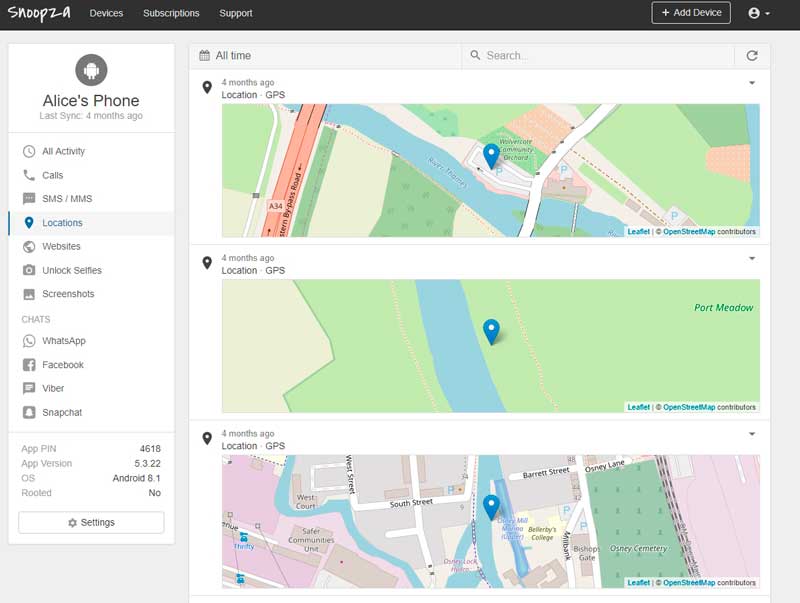
You must have contact list tracking too. Without it, it would be hard to know with whom the target person was speaking.
For example, it could be your wife’s best friend, her lover, a business competitor, a supplier, and so on. Therefore, it is very important to get detailed information, not only the chat history.
Snoopza collects all tracked information in a personal account. This account is accessible only by you, but you can access it from any computer. You just need an internet connection and a web browser.
The spy app works while hidden—your actions will be kept a secret. Of course, if you want to share this knowledge with the target person, you can switch off the hidden mode or just share the information — it is up to you.
How to Protect Yourself
In the end, we want to give some advice to those who wish to protect themselves from Viber hacking. Below is a list of simple rules that will help you to avoid being hacked:
- Do not leave your phone unattended, even in the company of your closest friend or spouse. Wives and husbands are the people who most often hack Viber and read others’ chat histories.
- Password protect your phone.
- Install a separate password on the application itself. It is available for Android 7 and up. This feature does not require the installation of any additional programs.
- Use an antivirus.
- Check the date and time of when the messages in your Viber account were read — sometimes, it helps catch that you are being tracked by somebody.
- Change the password to your Google account at least once a month. Your password should be powerful — at least 12 characters with numbers and special symbols.
What is the best way to hack Viber on Android phones?
There is no perfect solution. Ideally, you should find what works best for you. We recommend using either the built-in functionality in the messenger itself or use the Snoopza free keylogger.
Snoopza is good because it allows you to not only learn what about your child, spouse, colleague, or anyone else has said but also get other information.
A chat history together with the location information and screenshots is much more informative than the chat history alone.
Share with us if you know any other ways to hack Viber.