
WhatsApp is one of the most popular messengers. This year more than 3 billion users around the world use messenger every day. Sometimes people want to read someone’s messages and ask how to spy on WhatsApp messages from another phone.
On this page, you will learn three methods to track not only text messages, but also voice recordings, photos,s and video messages.
What is WhatsApp
Before we discuss the spying methods, let’s clarify the main terms. The first term is WhatsApp itself.

You might wish to track it even if you do not use it (for example, if you want to spy on your son’s or daughter’s phone).
WhatsApp is a free messenger for iOS and Android smartphones.
To use it, you must download the application from AppStore or Google Play.
The app is free and does not contain advertisements. With this software, people can send each other:
- Text messages
- Voice messages
- Photos and videos
Moreover, people can make voice or video calls. All these features are available for free.
For example, you can be in Germany and call someone in the United States – and the call will be free!
The only thing you need to make calls or share information is the Internet.
Users love WhatsApp for its features and because it is free. Its developers are paying attention to security as well.
They use end-to-end encryption to protect privacy. This is the second term you must learn.

End-to-end encryption is a modern method to protect a user’s privacy.
Only people who are speaking with each other have the “keys” to encrypt the message.
This technology is used by most modern messengers, including Viber and Telegram.
Fortunately, you do not need to understand all the terms; you just need to get to know them.
To read someone’s messages, you do not need special knowledge. Below you will find 3 methods. Read all of them and choose the best one for you.
Method №1 – MAC spoofing
Do not confuse MAC spoofing with macOS computers, as this method has nothing in common with the macOS or Apple.
MAC in this context means Media Access Control. In simple terms, it is an Ethernet or LAN address.
This method is the most complicated one.
If you are searching for something more convenient, scroll ahead to the next methods.
We will not go deep into the details of how MAC spoofing works.
We have prepared a short guide on how to use this method:
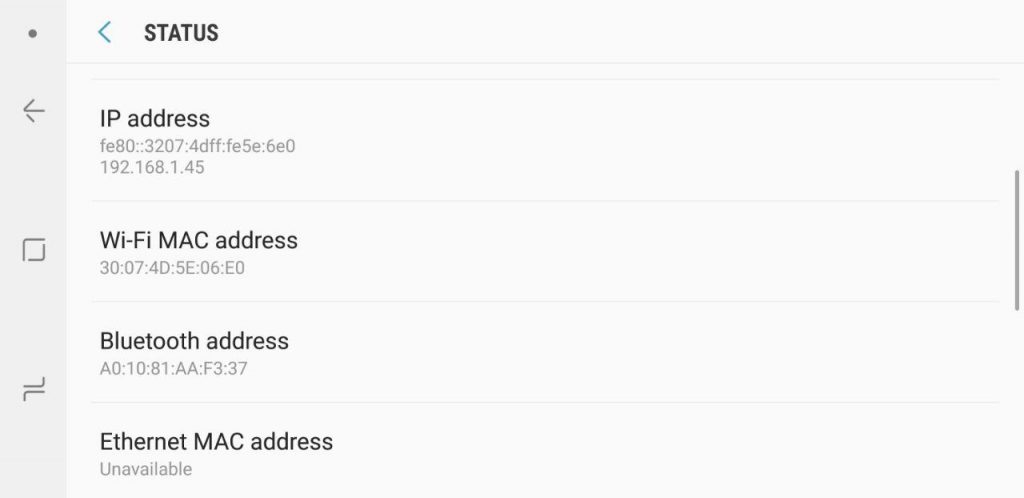
Step 1: Learn the MAC address of the target device. You must have access to it. The way you access it will depend on the Operating System:
- For iOS phones – Settings > General > About > Wi-Fi Address
- For Android phones – Settings > About Phone > Status > Wi-Fi MAC Address
If the target device uses a home or office Wi-Fi, you can learn the MAC address using your own computer.
- For macOS – System Preferences > Network > Advanced > Hardware
- Windows – proceed to the Network and Sharing Center > Change Adapter Settings > Status > Details
You will see something like – 03: B3: 12: E4: 27: BA. This is the MAC address.
Step 2: Set up the target device. Follow these steps:
- Delete WhatsApp from your own cell phone.
- Download and install it on your phone app to change your MAC address. For example, use WifiSpoof or BusyBox. These applications are available for iOS and Android.
- Install the WhatsApp application on your own cell phone.
- Enter the phone number of the person on whom you want to spy. The target phone must be next to you at this moment, as a code will be sent via SMS to this number.
- Activate the WhatsApp application on your own mobile.
- Reset the original MAC address on your device.
After you complete all the steps, WhatsApp on your smartphone will work with the same account that’s on the target device.
If the person has a backup, you can download it as well. If there is no backup, you can still use this method, but only for new messages.
Be careful about two things.
First: The target person can discover that you are tracking his or her messages.
Second: Changing MAC addresses is against the law in some countries.
Therefore, before you complete all the steps, make sure you are not breaking the laws of your country.
Method №2 – WhatsApp Web
This method is much easier than the first one but does not provide as much freedom for tracking.
Starting in 2015, users could log into their WhatsApp accounts on Windows or macOS computers and laptops.
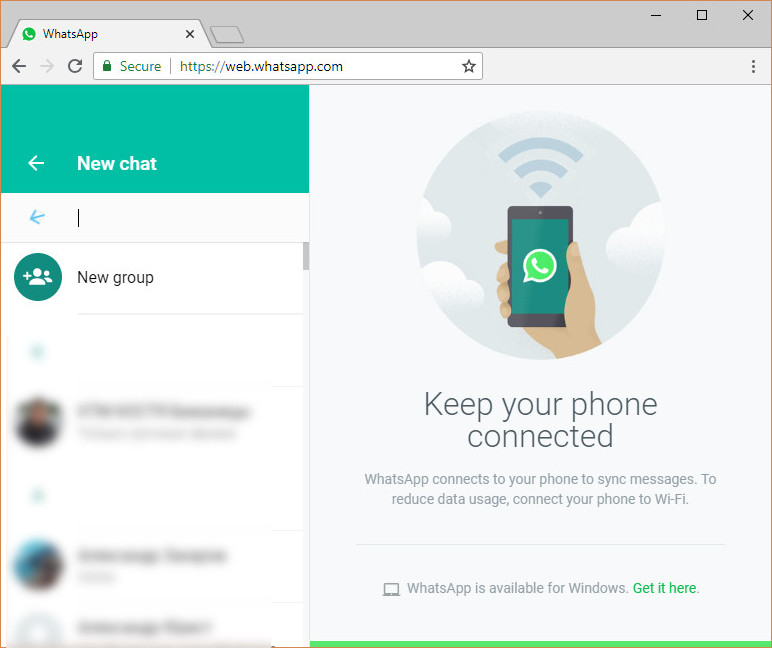
If the target device is next to you, follow these steps:
- Open the following on your computer: https://web.whatsapp.com;
- Open WhatsApp on the target smartphone;
- Find the WhatsApp web button in the application and click on it;
- Point the camera at the QR code on your laptop screen.
After this, the messages will open on your computer.
This will work if you do not log out and if the person being tracked does not cancel all connections.
Usually, the person being tracked quickly realizes that someone is tracking him or her, and cancels all connections.
For that reason, this method is good only if you want to read something once, to clarify the situation. It will not work long.
Please note that after 2019, these methods are no longer safe, as after the last updates, the “victim” device receives notifications and reminders indicating that their account is being used on the computer.
Moreover, now it is even possible to see some details, such as an Operating System.
This means you ca not hide your tracking and that the target can learn who is tracking him or her.
Method №3 – Hoverwatch and other spy apps
When you are ill, you go to the doctor. When you want to track someone, it is best to go with a specialist as well. In this case,
it would not be a person but, rather, professional software.
Use a spy application to track someone on WhatsApp.
This method can hide everything and give you the most information.

Because of end-to-end encryption, you cannot use any spy app; you must choose between them.
Hoverwatch is an application that allows you to see WhatsApp messages. Moreover, this software allows you to:
- How track other messengers
- Facebook activity check
- View phone calls and SMS
- Get notifications about replacing the SIM card
- Track locations
- And much more
Complex tracking is much better.
Just imagine that you want to spy on your spouse, and your husband or wife has two SIM cards.
Each time she or he replaces it, if you track just one phone number, you will never learn about the second.
Another example is that you want to monitor your child. You learn something, but still do not understand what it is and how to use it. With location history and other information, you will get the full picture.
To use Hoverwatch, follow three simple steps:
- Sign up for free;
- Download the application;
- Install the app on the target device.
If you are expecting to use the spy app without touching the victim’s device or by using just the phone number, you will be disappointed. You might have seen such offers on the Internet, with scammers promising magic technology but in real life, such offers are fake ones.
To track a smartphone on Android or iOS so that you can read WhatsApp messages or get other information, you will need to access the target device.
The question is, do you need to access it just once, as with Hoverwatch, or regularly?
Once you have installed Hoverwatch, you can collect all the messages from WhatsApp and see them in the Control Panel.
Everything works remotely; you do not need to have the phone in your hands. It also works in secret; the person will not see any changes in his or her device.
Is it possible to spy on WhatsApp messages from another phone in this year?
As you saw, yes, it is possible. We provided 3 methods for doing it.
We recommend choosing the last method, as it is efficient and easy to complete.
With Hoverwatch, your tracking will stay hidden. It is important to get information in its original form.
A person who knows that he or she is being watched might change his or her behavior and will not learn anything.